When a building management system (BMS) isn't talking to your new Modbus or BACnet thermostats, it’s usually the first time the software gets blamed. But that's usually wrong. In my experience, probably 90% of those dropped connections are because of field wiring—simple things, like a bad wiring layout, missing resistors, or a simple setting that's just off.
Here is a practical, ground-up guide to help you correctly wire your RS485 daisy-chain network, avoid common installation traps, and quickly troubleshoot any communication faults you find.
1. The Master-Slave Principle: How the System Works
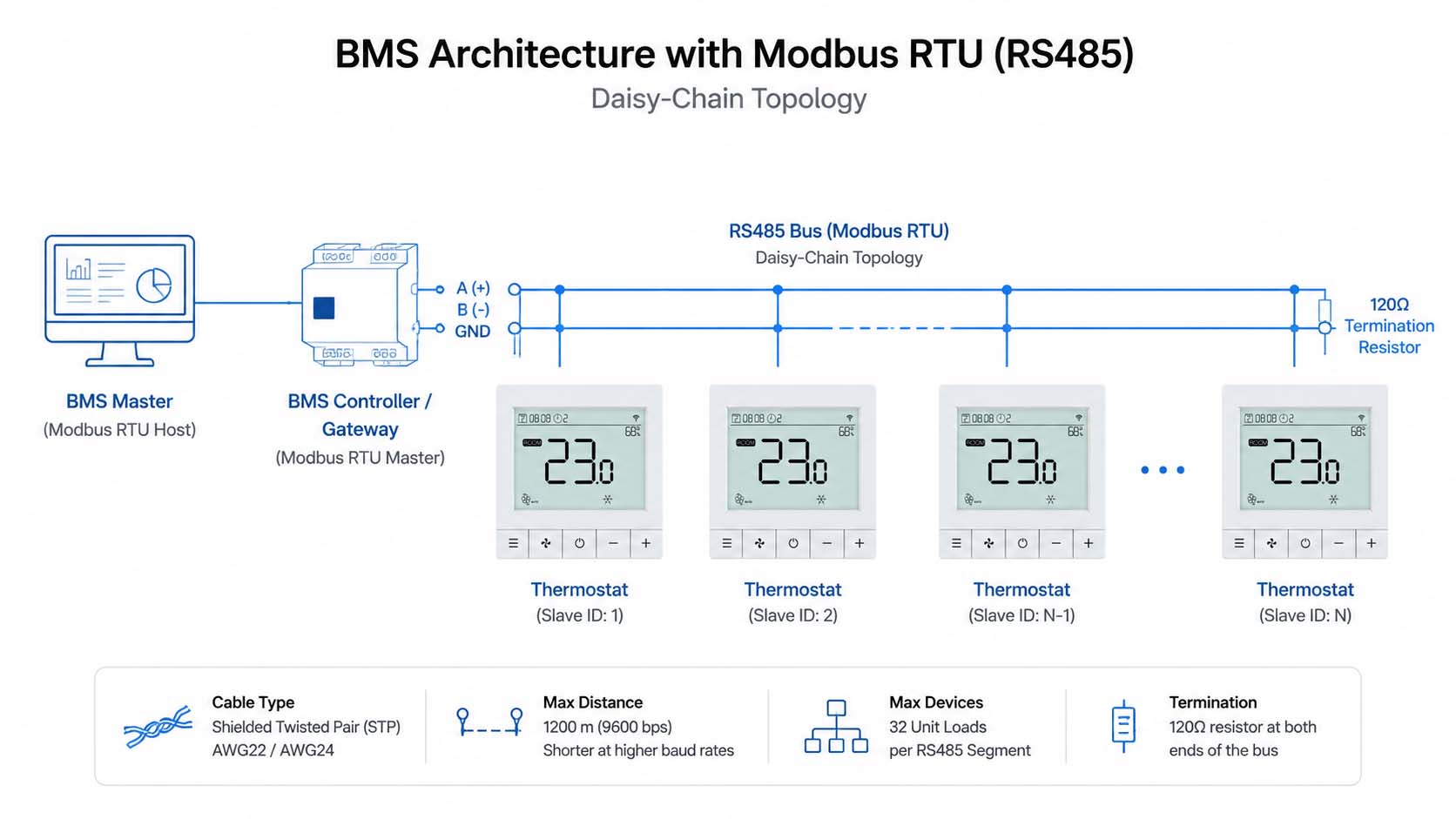
Think of the whole system as a master-slave principle. The BMS is the master. The thermostat is the slave. The BMS constantly polls the thermostats to pull data (like room temperature or humidity) and push commands (like changing the setpoint or fan speed).
The reason we use RS485 for this is its differential signaling. This makes it tough enough to handle electrical noise over long distances in commercial building HVAC projects, but only if you set up the physical architecture right.
2. Correct Wiring: The Power of the Daisy Chain
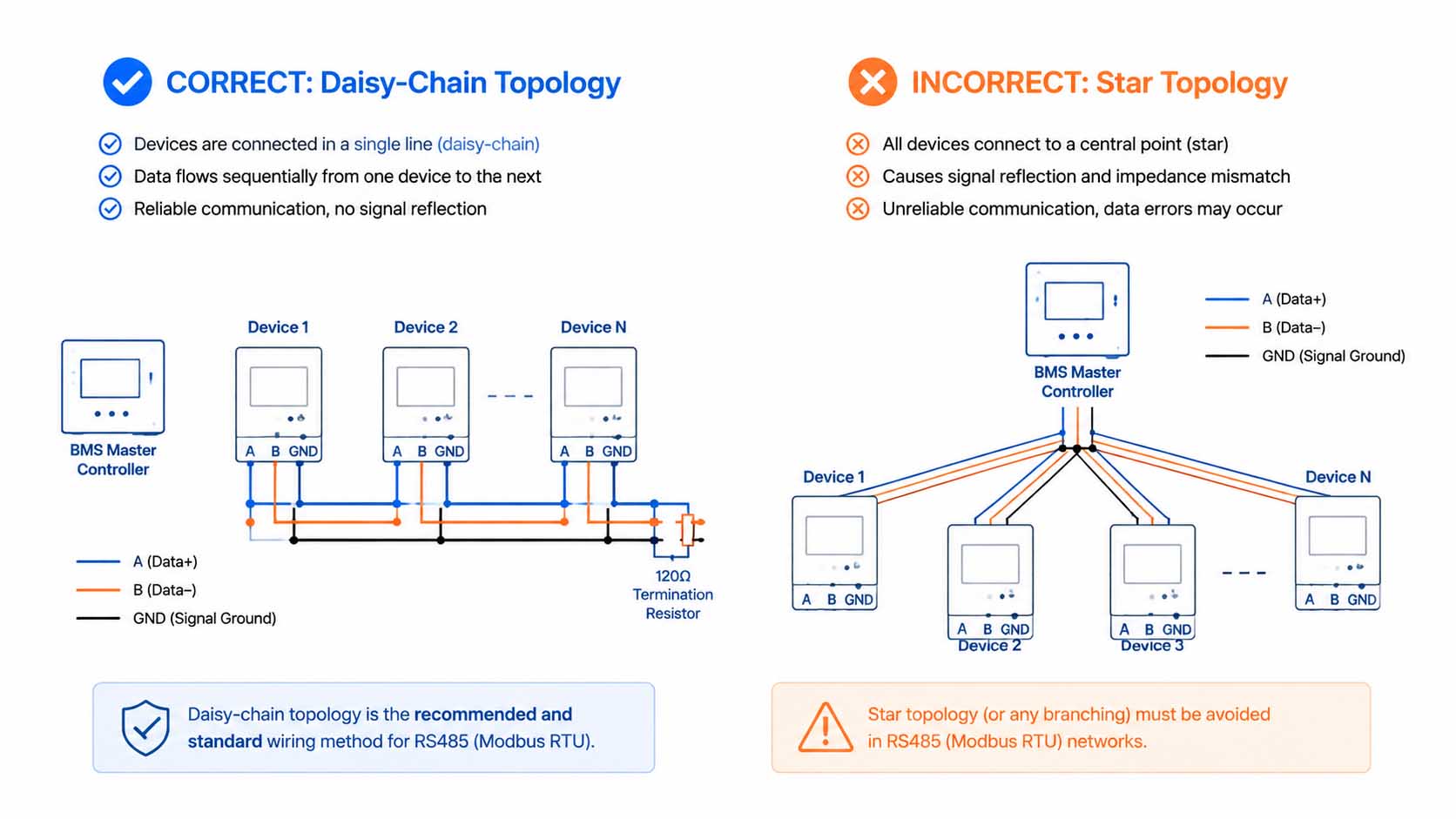
If you want a stable Modbus RTU network, you have to get the cable layout right. There are no exceptions here. RS-485 demands a strict daisy-chain, or bus, topology. This simply means running the cable sequentially from one device to the next—Device A to Device B, to Device C, and so on.
No branching. Never run a separate cable to each device from one central point. Avoid star, ring, or tee-branch setups. Branching off the main trunk creates signal reflections. These 'stubs' basically act as antennas that pick up electrical noise and corrupt your data packets, bringing devices down.
3. Cable Selection and Field Limits: Don't Skimp Here
Before you start looking at the code, check your hardware.
- Cable Type: Stick to shielded twisted-pair (STP) cable—AWG22 or AWG24 is what works best. Flat, untwisted wires won't cut it.
- Distance Limits: You can technically push an RS485 network up to 1,200 meters—that’s about 4,000 feet—but only if you drop the baud rate to 9600.
- Device Limits: Keep it under 32 unit loads (devices) per segment. Need more thermostats on the same bus? You will have to split the network using an RS-485 repeater.
4. Troubleshooting the Big Three: Your Quick Checklist
When a thermostat stops communicating, look for these top three physical layer problems first.
- Reversed Polarity (A and B Swapped). RS485 uses an A (Data–) and a B (Data+) line. This needs to be consistent across every single device. A simple miswiring will kill the whole bus. If everything else looks right, just swap A and B on a non-responsive device as a quick test.
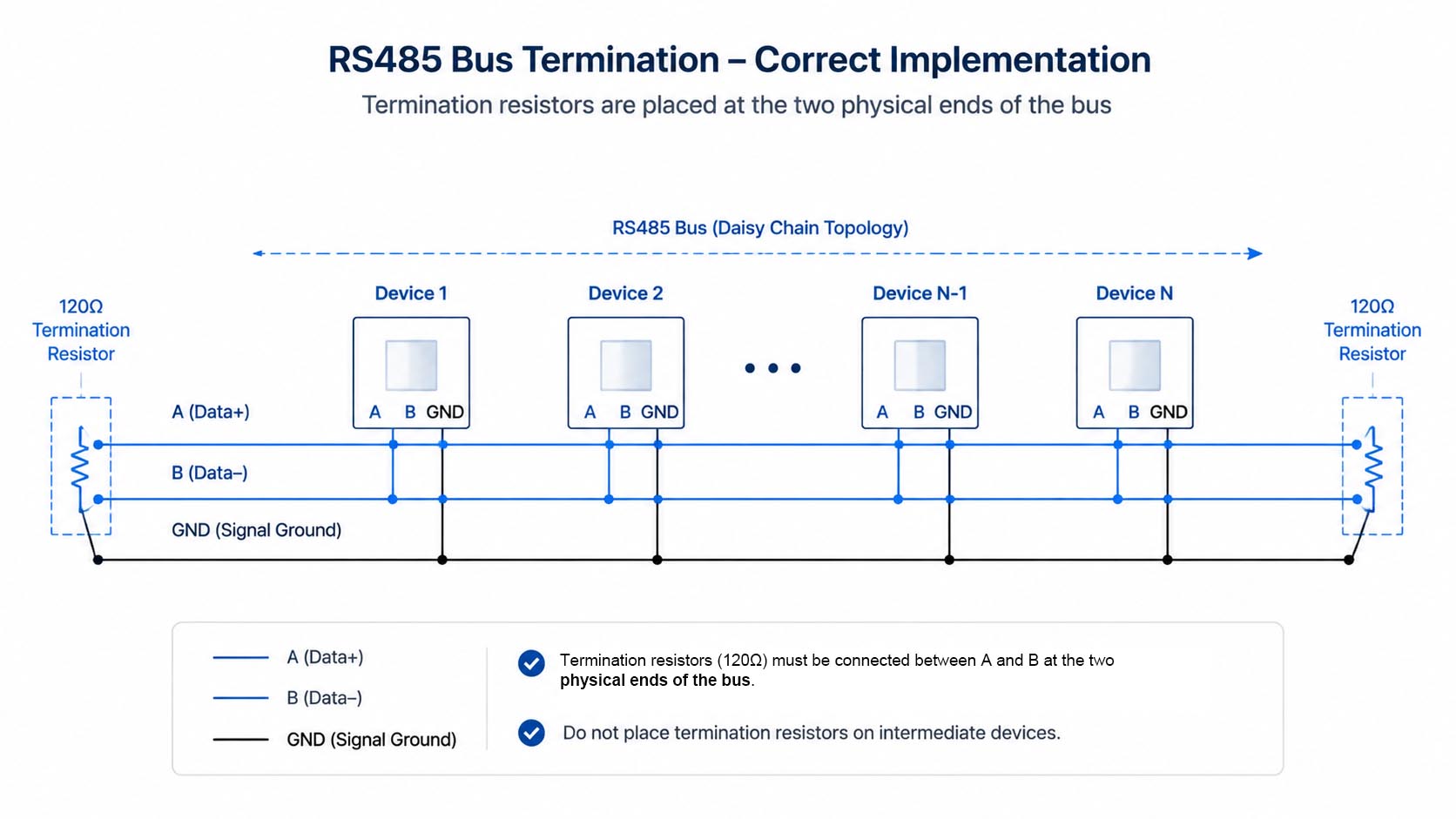
- Termination Resistors. You must place a 120-ohm termination resistor at both physical end-points of the main trunk line. Never put resistors on devices in the middle. Intermediate resistors will overload the line and cause problems.
- Shielding and Ground Loops. Make sure you tie the shield together on the common ground terminal at every device. But here's the rule: ground that shield only at ONE end, usually at the master controller, to prevent a ground loop. Floating shields are also bad news.
5. Software Configuration Checklist: Are the Settings Right?
Wiring looks perfect but the BMS still cannot see the thermostat? Time to check the software settings. This is another area that frequently goes wrong.
- Slave ID. Think of this as the thermostat's unique phone number. Duplicate IDs will cause a network conflict and make the bus unusable. Check every single device.
- Baud Rate and Parity. The controller and all slave thermostats must share the exact same configuration: Baud Rate, Parity, Data Bits, and Stop Bits. Match it across the board, like 9600, None, 8 Data Bits, 1 Stop Bit.
- Register Map. Check that the BMS knows where to find the data. At E-TOP, we make this easy. We provide detailed, customized Modbus register maps so you can map points instantly. Prevents headaches.
6. Modbus vs BACnet: Is There a Clear Winner?
I get asked this all the time: "Is Modbus better than BACnet?" The truth is, they're both great at different things. Modbus is solid for direct device-to-device communication, but BACnet MS/TP is built for complex, multi-vendor centralized building systems (BMS).
| Protocol | Typical Use Cases |
|---|---|
| Modbus RTU | Cost-effective direct device control, smaller-to-medium BMS, industrial. |
| BACnet MS/TP | Large commercial buildings, multi-vendor building systems, centralization. |
| KNX | Luxury European home automation and smaller commercial projects. |
| OpenTherm | Residential boiler heating control. |
7. How E-TOP Supports Your Building Automation Projects
At E-TOP, we are more than just a manufacturer. We are engineers who understand these field integration challenges. We back global brands with more than just a piece of plastic. We offer technical expertise to help you build a smarter, more efficient HVAC control system.
Here is how we support you:
- Hardware options for both Modbus RTU and BACnet MSTP.
- Customized Modbus register maps to fit your existing BMS, preventing re-commissioning headaches.
- Address pre-configurations to save you valuable field time.
- Private label solutions to build your own brand recognition.
Thinking about your next building automation project? Let’s talk about how E-TOP can help you build a brighter, greener future.

FAQ
Q1: How far can a Modbus RTU RS485 thermostat communicate?
A: Technically, an RS485 network can stretch up to 1,200 meters—that’s about 4,000 feet. But there is a massive catch: you will have to drop your baud rate to 9600 for that to work. Higher speeds mean shorter distances.
Q2: Why can't I use star wiring for RS485?
A: Never use star wiring. It creates messy signal reflections at every branch. Those reflections collide with your data, corrupting the packets. It’s the number one cause of dropped connections in the field.
Q3: What specific cable do I need for Modbus thermostats?
A: Always use shielded twisted-pair (STP) cable. AWG22 or AWG24 is what I recommend. Don't use flat or untwisted wires; they won't cut it against electrical noise.
Q4: Is Modbus or BACnet better for my building automation?
A: It depends on what you need. Modbus is solid and cost-effective for direct device-to-device communication. BACnet is built for complex, multi-vendor centralized building systems (BMS).