How to Connect a Wireless Boiler Thermostat Technical Guide for Installers & OEM Partners
In the European heating market, field reliability is everything. For professional HVAC installers and OEM/ODM brands, a flaky wireless connection means costly callbacks and eroded margins. E-TOP’s 868MHz wireless room thermostats are built specifically to counter this, offering bulletproof RF stability and straightforward volt-free relay integration with major European boiler platforms.
Below is the technical walkthrough for wiring and commissioning our wireless receiver systems.
1. Pre-Installation Checklist
Before cracking open any casing, tick off these essentials:
-
Isolate Power: Lock off the mains supply to both the boiler and the heating control circuit. Test before you touch.
-
Protocol Match: Crack open the boiler specs to ensure it accepts a standard Volt-Free Dry Contact (On/Off) switching signal. E-TOP receivers pack heavy-duty SPDT switch contacts (NO/NC) designed to handle up to 250 VAC / 10 A switching loads.
-
Toolbox: Grab a small flat-head terminal screwdriver, sharp wire strippers, your trusty digital multimeter, and the boiler's original wiring schematic.
-
Compliance: Keep it legal. All hands-on work must strictly align with local electrical codes, such as the IET regulations over in the UK, alongside specific manufacturer mandates.
2. Wiring the Wireless Receiver
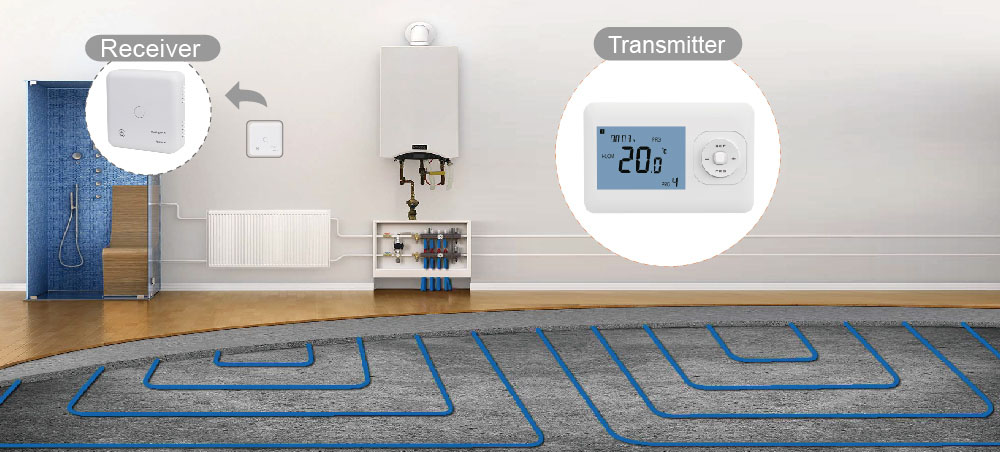
The receiver is the nerve center bridging the boiler's PCB to the RF thermostat.
-
Back off the retaining screws and drop the boiler’s main control panel cover to access the internal terminal block.
-
Locate the dedicated room thermostat terminals (frequently marked as RT, LS/LR, or Room Stat).
-
Mains Feed: Run your Live (L) and Neutral (N) lines straight from a local fused spur into the receiver's power inputs (230 VAC, 50/60 Hz).
-
Control Signal Wiring:
-
Take the two-core switching wire and land them directly onto the receiver’s COM (Common) and NO (Normally Open) terminals. Route the other end back into the boiler's switched room stat loop.
-
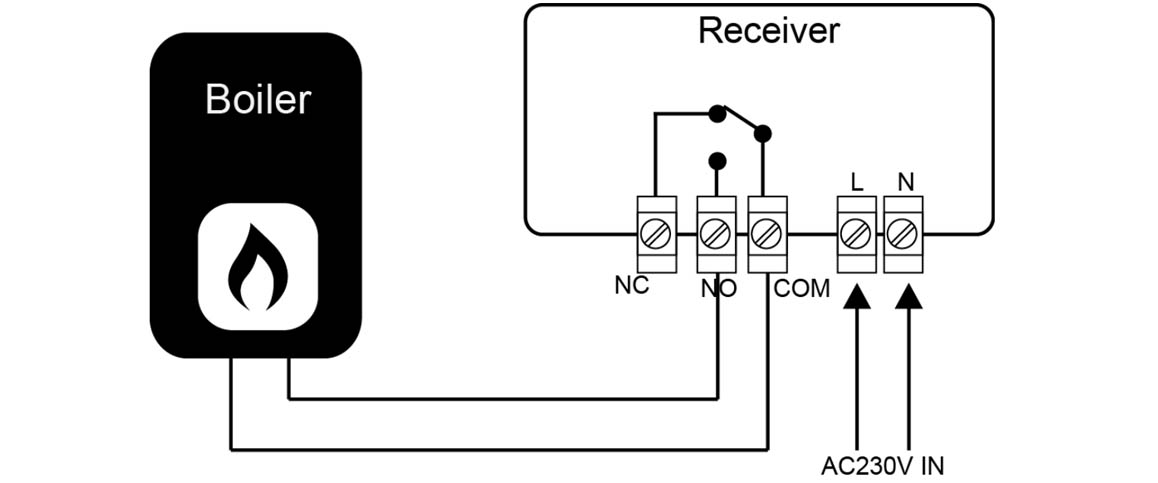
Crucial Safety Note: Double-check everything. Make absolutely sure that no stray 230V mains voltage is feeding back into a volt-free boiler PCB layout. E-TOP receivers use isolated switch contacts for a reason—to prevent expensive board blowouts on the boiler side.
3. Binding & RF Pairing
We opt for the 868MHz frequency band for a simple reason: it cuts right through thick European brickwork where crowded 2.4GHz Wi-Fi channels fail completely.
-
Prep the Receiver: Press down and hold the physical Code pairing button located on the receiver unit. Keep it pressed until the Heating Indicator (LED 1) begins flashing at a rapid rate.
-
Configure the Stat: Grab the E-TOP thermostat unit and make sure it is powered down. Now, press and hold the SET button. Don't let go until you see the pairing code flash onto the display screen, then tap the + button to kick off the wireless handshake.
-
Confirm the Link: Step back and wait a moment. The flashing LED 1 on the receiver will suddenly turn solid. That means your link is successfully locked in.
-
Live Test: Power the thermostat back up, then ramp up the target temperature way past the current room ambient. Listen closely—you should hear the internal relay click over instantly, followed by the boiler's pump or fan spinning up into action.
Note: Want to speed up high-volume job rollouts? Most bulk E-TOP shipments land at your warehouse as pre-bound kits that sync automatically the second you power them up.
4. Field Troubleshooting
-
No Heat Call: Relay clicking but the boiler's main burner staying dead? Check the boiler's terminal strip. Nine times out of ten, the factory-fitted link jumper hasn't been removed from the RT terminals.
-
Dropouts & Range Issues: Avoid mounting the receiver flat against a massive metal boiler casing or buried inside a shielded utility tank cupboard. Give it breathing room—at least 30cm away from metalwork to keep the RF footprint wide open.
-
Backward Switching Logic: If the heating fires up when the thermostat says "OFF" and cuts out when it asks for heat, you've landed your wire onto NC instead of NO. Swap that terminal wire over to NO, and you're good to go.
Why Partner with E-TOP?
With over two decades of dedicated OEM/ODM manufacturing under our belt, we don’t just build thermostats—we engineer field-stable HVAC assets:
-
High-penetration 868MHz RF logic for stable long-range multi-room connectivity.
-
Reliable Volt-Free Dry Contact SPDT switching on a robust hardware platform.
-
Rigorous CE and RoHS certification built into every hardware revision.
-
Seamless drop-in compatibility with legacy and modern boiler systems including brands like Vaillant, Bosch, Viessmann, Baxi, and Worcester.
Tailored for B2B Operations: From custom firmware calibration and white-label housing to model-specific wiring documentation, we provide the engineering backbone your brand demands.

---------------------------------------------------------------------------------------------------------------------------------------------------------------------
FAQ
Q1: What is the difference between COM, NO, and NC wiring on a wireless receiver?
A: Think of COM (Common) as the input gateway where the signal enters from the boiler loop. NO (Normally Open) acts as a broken switch—the circuit stays wide open and the boiler stays completely dead until the thermostat demands heat, causing the relay to close. On the flip side, NC (Normally Closed) keeps the circuit closed by default. For the vast majority of standard European boiler installations, always stick to the COM and NO terminal pair. Wiring it this way ensures the system only fires up when the indoor temperature drops below your setpoint.
Q2: Why is 868MHz frequency preferred over 2.4GHz Wi-Fi for wireless boiler thermostats?
A: It all boils down to basic physics and wave penetration. The lower 868MHz frequency band punches through thick residential stone and masonry walls far better than high-frequency alternatives. More importantly, while 2.4GHz Wi-Fi channels are absolutely swamped with data traffic from domestic routers, streaming sticks, and smartphones, 868MHz remains a dedicated, quiet band reserved for low-power devices. This guarantees zero signal dropouts, drastically extends the thermostat’s battery lifespan, and secures a rock-solid link over long distances.
Q3: Can E-TOP wireless thermostats be customized with specific wiring diagrams for OEM brands?
A: Absolutely. B2B white-labeling is our core business. As a dedicated OEM/ODM manufacturer, E-TOP doesn't just print your brand logo on the front. We can completely overhaul the receiver's physical housing, inject customized firmware to match your system parameters, and design bespoke wiring schematics tailored to your target boiler platforms (whether that's Ideal, Vaillant, or Bosch). Our in-house engineering squad supports your development team right from the initial prototype phase up to full mass production rollout.
